How to make the right choice for your desktop virtualization?
Hybrid work environments are becoming more widespread, and desktop virtualization services (Desktop as a Service, or DaaS) are emerging as essential solutions for enabling teams to work remotely, smoothly, and securely. In this article, we compare two major Microsoft solutions: Azure Virtual Desktop (AVD) and Windows 365.
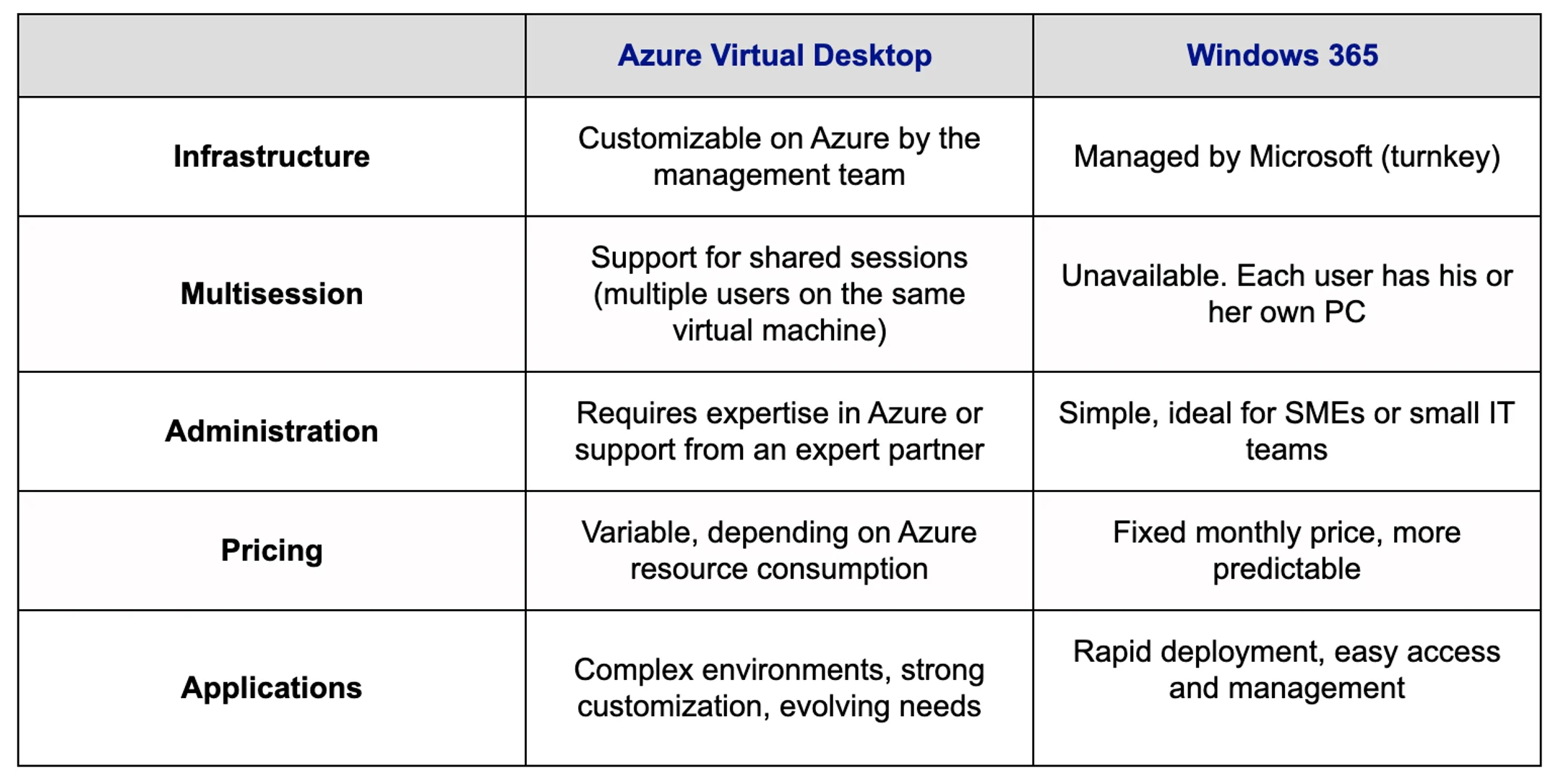
While these solutions have similar objectives (providing remote access to workstations and applications), they differ significantly in terms of architecture, cost, and level of customization. Find out how these characteristics can influence your organization’s choice and, ultimately, help you make the best possible decision for your business.
This comparison is based on the hands-on expertise acquired by COFOMO, recently recognized by Microsoft for the second consecutive year through the Microsoft Azure Virtual Desktop (AVD) Specialization. This distinction reflects a proven know-how in implementing virtualization solutions tailored to enterprise environments.
What is Azure Virtual Desktop (AVD)?
Seamless integration with Azure
Azure Virtual Desktop (AVD) is a service based on Microsoft Azure infrastructure. It provides secure deployment of applications and virtual desktops, based on Azure’s recognized security and performance standards. Specifically, AVD can host several Windows sessions on a single virtual machine (multisession). This enables users to access their business tools and documents anywhere, from any connected device, including a tablet or phone.
The advantages of Azure Virtual Desktop
- A highly customizable solution
AVD can be fine-tuned to your organization’s needs. IT teams can configure infrastructure, security rules, and resource management to meet specific scenarios. - Centralized management via Azure
The Azure platform offers a unified management console for administering users, virtual machines, and applications. This centralization simplifies maintenance and performance monitoring. - Access to a shared virtual machine (multisession)
Thanks to the multisession function, several users can connect to the same instance of Windows 10 or Windows 11 while retaining their personal session and environment. - On-demand infrastructure
It is possible to scale resources (capacity, storage, etc.) according to activity peaks and troughs, thus optimizing costs. - Usage-based billing
Costs are linked to the actual use of Azure resources (computing time, storage, etc.). A flexible model that can prove particularly cost-efficient for occasional or flexible use. - Native security
AVD leverages Azure’s advanced security features (Microsoft Entra ID, conditional access, encryption, etc.) and enables proactive monitoring of connections.
When to choose Azure Virtual Desktop?
AVD is a solution particularly well-suited for organizations already embedded in the Azure ecosystem or those seeking a scalable, flexible, and highly customizable virtualization approach. Its adoption is most relevant in the following contexts:
- Complex virtualization needs, especially in multi-session mode, where multiple users need simultaneous access to the same Windows instance;
- The need for advanced control over infrastructure, including fine-tuning, advanced resource management, and custom integrations with other services or systems;
- An existing Azure infrastructure or an upcoming migration project to this cloud environment;
- An internal IT team with expertise in Azure services, or collaboration with a specialized partner (such as COFOMO) to ensure effective design, deployment, and management of the AVD solution.
What is Windows 365?
A turnkey “PC in the cloud” experience
Windows 365 is a Microsoft service that lets you run a Windows 10 or Windows 11 desktop directly from the cloud, without having to manage the underlying infrastructure yourself. Unlike AVD, Windows 365 does not support multisession operation: each user has his or her own virtual machine. This gives everyone a dedicated PC in the cloud, with consistent performance and personalization, regardless of the access platform (computer, tablet, phone).
The advantages of Windows 365
- Extremely easy to use
The entire infrastructure (servers, maintenance, etc.) is managed by Microsoft. Configuration steps are reduced, and no advanced knowledge of Azure is required. - Simplified administration
The Windows 365 management console is intuitive. This makes it an ideal solution for SMEs that don’t necessarily have an IT team with expertise in virtualization. - Predictable pricing model
Windows 365 adopts fixed monthly pricing, making budgeting easier and avoiding usage-related surprises. - Seamless integration with the Microsoft 365 ecosystem
Windows 365 integrates smoothly with your office tools (Teams, Outlook, OneDrive, etc.), offering a seamless user experience and more effective collaboration.
When to choose Windows 365?
Windows 365 is particularly relevant in the following contexts:
- A turnkey solution is preferred, with rapid deployment and minimal configuration.
- Each user requires a dedicated cloud PC with a uniform experience.
- Simple and predictable pricing is sought, with no need to manage resource scaling or handle complex administration.